Anatomy Of An OnApp Cloud
The diagram above is a very simplified version of of our cloud architecture. Don't know what a hypervisor or a SAN is? Read on.

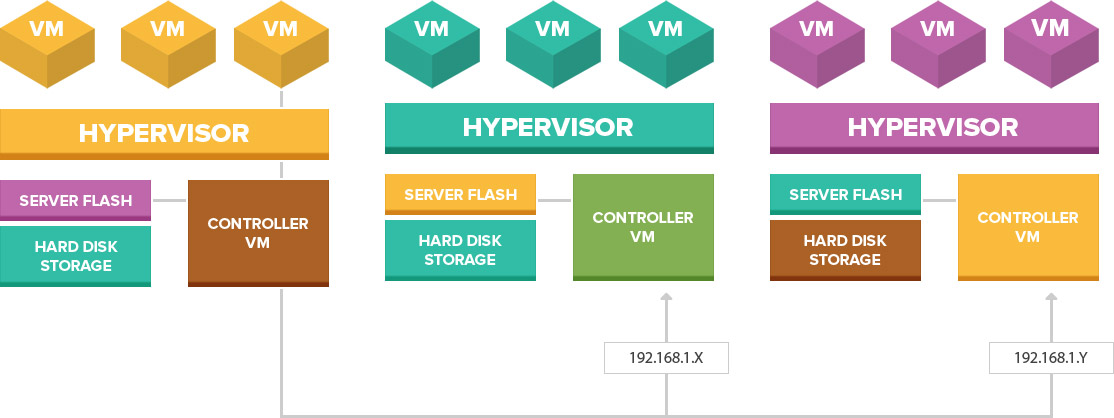
The diagram above is a very simplified version of of our cloud architecture. Don't know what a hypervisor or a SAN is? Read on.

You can search Google for a definition of a hypervisor and be overwhelmed with a lot of technical jargon. Basically a hypervisor provides the virtualization in a cloud but no data is actually stored in a hypervisor. The hypervisor provides the CPU power and memory to power a cloud server and if a hypervisor fails, cloud servers bound to it will be automatically rebooted onto other hypervisors thus providing the auto-failover.

Cloud Computing: Compute, SAN, CDNOnApp is the program that powers the whole cloud setup. It works from a centralized server that monitors the hypervisors and provides the auto-failover in case a hypervisor fails. The cloud will also operate as normal even if the control panel fails or taken down for maintenance. Cloud server snapshots are also stored on this multi-terabyte RAID protected central server.

We employ two levels of backup. On the VM SnapShot Backup server, we backup an image of all VMs which are used in case something goes wrong with a VM and the whole container needs to be restored.

All data is stored on a lightning-fast SAN Storage system. A SAN is a huge array of drives collectively configured in RAID arrays. The drives are all 15k RPM SAS and SSD (Solid State Drives). With an incredible 40Gbps throughput into the SAN Fabric, the SAN can achieve speeds up to 1600MB/s Read and 1300MB/s Write out-performing any SAN/Cloud solution on the mass cloud market today. There is also a backup SAN in the extremely unlikely case that the primary SAN has a critical downtime event.

We backup all client data to a separate storage cluster that runs Idera Server Backup. Backups are CDP (Continuous Data Protection) which means sites are backed up multiple times per day instead of the standard weekly backup you find on most hosts. Linux hosting clients can also manage their backups via their control panel. This integration is not available on Plesk Windows but data is still backed up on the same schedule.
